
前言
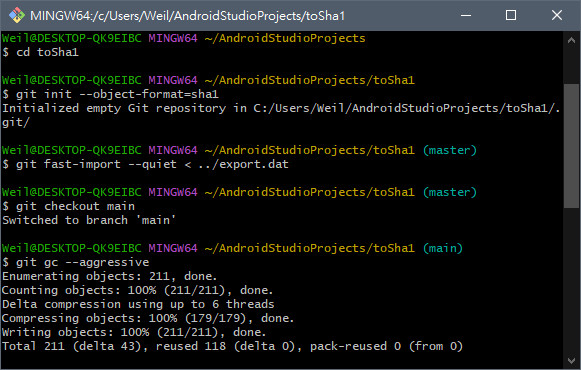
昨晚心血來潮,用了 Gitea 建了一個儲存庫,那時候手賤選了 SHA256,想說要用最新的,結果當我寫完專案,想要備份到 Github 上,才發現推送不上去,跳出錯誤。
fatal: the receiving end does not support this repository's hash algorithm
fatal: the remote end hung up unexpectedly
看到關鍵詞 hash algorithm 就知道是選了 SHA256 的黑鍋。
如果遇到,最快的方式是直接建一個新專案,然後 add 全部代碼,然後 commit,這是最快的解法。
當時,就是想要保留歷史紀錄,結果找老半天,沒找到怎麼保留歷史紀錄轉換成 SHA-1 的方法,真的是爬很多資料,試了一堆方法。
下面分享我試成功的命令。
將 SHA256 專案轉成 SHA1 的格式
在 SHA-256 repo 中,export 紀錄。
cd original-repo
git fast-export --all --use-done-feature --reencode=yes > ../export.dat
建立 SHA1 的新專案
cd ../new-repo
rm -rf * .git  # 清空目錄
git init --object-format=sha1
匯入所有歷史紀錄
git fast-import --quiet < ../export.dat重建 & 清理
git checkout main
git gc --aggressive
重新簽章(非必要)(Rebase)
git rebase --root -i --exec 'git commit --amend --no-edit -S'
# -i 代表互動模式
# --root 從第一個提交開始
# -S 代表用目前的 GPG key 簽署

