Category:Note

Found 38 records. At Page 5 / 8.

Bash 自動備份網站與異地備份

-
更新於

這是我現在所用的方法,直接分享出來,備份壓縮網站資料與資料庫十日,自動刪除近十日之外的檔案。

建立一個 backup.sh 檔案,內容如下:(FTP地址帳密、網站路徑、資料庫密碼…要自己修改一下)

#!/bin/sh

THESITE="example.com"
THEDATE=$(date +%Y-%m-%d_%H_%M_%S)

mysqldump --defaults-file=/home/user/secret.cnf --user=root --host=localhost --all-databases | gzip > /var/www/$THESITE/backup/db_$THEDATE.sql.gz

tar czf /var/www/$THESITE/backup/site_${THEDATE}.tar /var/www/$THESITE/public_html/
gzip /var/www/$THESITE/backup/site_${THEDATE}.tar

find /var/www/$THESITE/backup/site* -mtime +10 -exec rm {} \;
find /var/www/$THESITE/backup/db* -mtime +10 -exec rm {} \;

echo "OK"

ftp -n 31.170.xxx.xxx <<End-Of-Session
user USERNAME "PASSWORD"
binary
cd /public_html/backup/secret_path
put "/var/www/$THESITE/backup/db_$THEDATE.sql.gz" "db_backup.sql.gz"
put "/var/www/$THESITE/backup/site_${THEDATE}.tar.gz" "site_backup.tar.gz"
bye
End-Of-Session

wget http://backupsite.com/ -O /tmp/keep_online
rm /tmp/keep_online

創一個文檔在 /home/user/secret.cnf (或你喜歡的地方),然後設定權限 400 或 600 內容填入如下。

[client]
password="MYSQL_PASSWORD"

最後 在終端機 打指令

crontab -e

在最下面加入:(設定定時任務,零時零分自動備份網站並透過FTP外寄出去)

0 0 * * * sh /the_path_you_want/backup.sh

這樣就可以完成幾乎全自動的備份。


This entry was posted in Bash, Experience, Functions, General, Note, WebHosting By .

Telegram Bot 開發機器人 (2) Python

-
更新於

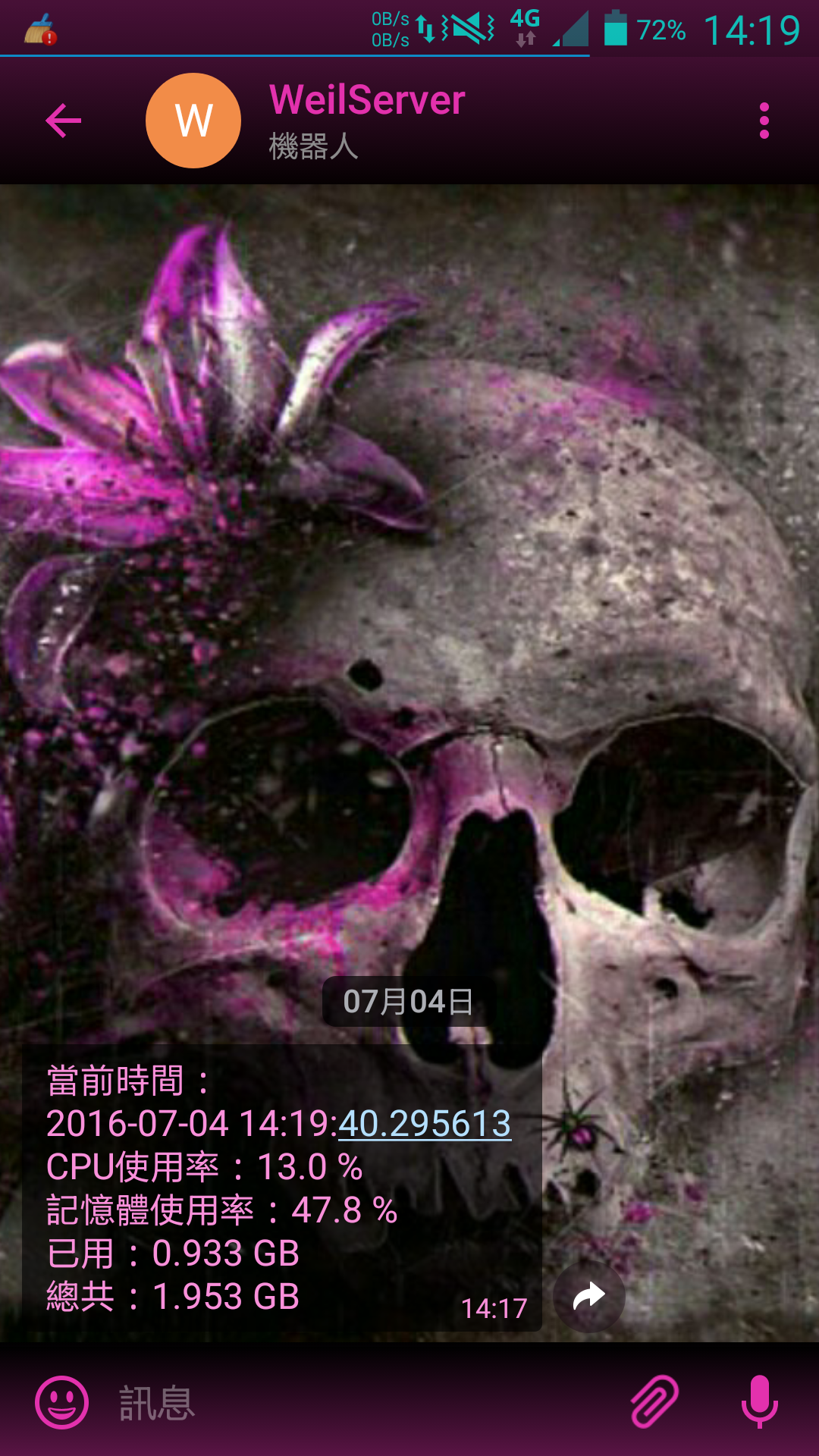
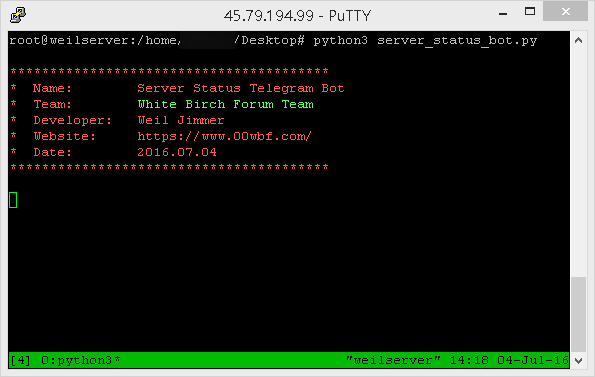
這是我第二篇文章有關於 Telegram 機器人,此機器人的功能極其簡單!監控伺服器的使用率,最近因為在伺服器又搞了一個很麻煩的東西,要時時刻刻注意有沒有異常。所以才寫了這個小程式(如圖)。

本文直接省略@BotFather產生機器人的說明,我想那應該不是問題。第一篇文章請參考:淺談Telegram開發機器人

本程式一旦運行,就不會停止,每隔固定幾秒鐘會自動更新訊息,會一直不斷的編輯,而不是一直送出(Telegram 有支持編輯訊息的功能)。直接上程式碼。這次使用Python,因為牽扯到系統,用 PHP 就不太適合了。

# coding: utf-8
"""By Weil Jimmer"""
import os,urllib.request,shutil,sys,re,datetime,json,psutil
from time import sleep
from sys import platform as _platform

def __init__(self):
	print("")

GRAY = "\033[1;30m"
RED = "\033[1;31m"
LIME = "\033[1;32m"
YELLOW = "\033[1;33m"
BLUE = "\033[1;34m"
MAGENTA = "\033[1;35m"
CYAN = "\033[1;36m"
WHITE = "\033[1;37m"
BGRAY = "\033[1;47m"
BRED = "\033[1;41m"
BLIME = "\033[1;42m"
BYELLOW = "\033[1;43m"
BBLUE = "\033[1;44m"
BMAGENTA = "\033[1;45m"
BCYAN = "\033[1;46m"
BDARK_RED = "\033[1;48m"
UNDERLINE = "\033[4m"
END = "\033[0m"

if _platform.find("linux")<0:
	GRAY = ""
	RED = ""
	LIME = ""
	YELLOW = ""
	BLUE = ""
	MAGENTA = ""
	CYAN = ""
	WHITE = ""
	BGRAY = ""
	BRED = ""
	BLIME = ""
	BYELLOW = ""
	BBLUE = ""
	BMAGENTA = ""
	BCYAN = ""
	UNDERLINE = ""
	END = ""
	os.system("color c")

print (RED)
print ("*" * 40)
print ("*  Name:\tServer Status Telegram Bot")
print ("*  Team:" + LIME + "\tWhite Birch Forum Team" + RED)
print ("*  Developer:\tWeil Jimmer")
print ("*  Website:\thttps://weils.net/")
print ("*  Date:\t2016.07.04")
print ("*" * 40)
print (END)

chat_id = "123456789"
api_key = "123456789:AAAAAAAAAAAAAAAAAAAAAAAAAAAAAAAAA"
root_dir = "/tmp/"
msg_id = ""
sleep_second = 5

def int_s(k):
	try:
		return int(k)
	except:
		return -1

def reporthook2(blocknum, blocksize, totalsize):
	do_nothing=True

def url_encode(url_):
	return urllib.parse.quote(url_, safe='~@#$&()*!+=:;,.?/\'')

def upload_URL(url,encode,data_X,method_X):
	file_name="temp_file_pyserverstatus"
	opener = urllib.request.FancyURLopener({})
	opener.version = 'Mozilla/5.0 (Windows NT 6.3; WOW64) AppleWebKit/537.36 (KHTML, like Gecko) Chrome/45.0.2454.101 Safari/537.36'
	opener.addheader("Referer", url)
	opener.addheader("X-Forwarded-For", "0.0.0.0")
	opener.addheader("Client-IP", "0.0.0.0")
	if method_X=="POST":
		local_file,response_header=opener.retrieve(url_encode(url), root_dir + file_name, reporthook2, urllib.parse.urlencode(data_X))
	else:
		local_file,response_header=opener.retrieve(url, root_dir + file_name, reporthook2)
	return open(local_file,encoding=encode).read()

def api_make_req_json(data_X):
	api_url = "https://api.telegram.org/bot" + api_key + "/"
	response=(upload_URL(api_url,"utf-8",data_X,"POST"))
	return json.loads(response)

def sendMessage(text,chatid):
	return api_make_req_json({"method":"sendMessage","chat_id":chatid,"text":text})

def editMessageText(text,chatid,messageid):
	return api_make_req_json({"method":"editMessageText","chat_id":chatid,"message_id":messageid,"text":text})

while True:
	time_now_str = "當前時間:\n" + str(datetime.datetime.now())
	cpu_useage_str = "CPU使用率:" + str(psutil.cpu_percent(interval=1)) + " %"
	memory_useage = psutil.virtual_memory()
	memory_useage_str = "記憶體使用率:" + str(memory_useage.percent) + " %\n已用:" + str(round(memory_useage.total*0.01*memory_useage.percent/1024/1024/1024,3)) + " GB" + "\n總共:" + str(round(memory_useage.total/1024/1024/1024,3)) + " GB"
	str_value = time_now_str + "\n" + cpu_useage_str + "\n" + memory_useage_str
	if msg_id=="":
		dom=sendMessage(str_value,chat_id)
		msg_id=dom['result']['message_id']
	else:
		editMessageText(str_value,chat_id,msg_id)
	sleep(sleep_second)


input("\n\n請輸入ENTER鍵結束...")

若在 Linux 的環境下,使用 tmux 輸入指令會比較好。因為它可以在背景運作,可以直接關掉 terminal。


This entry was posted in General, Note, Python, The Internet By .

淺談Telegram開發機器人

-
更新於

我做了一個很簡單的計時器,為了某群組裡面的高中生而設計,這也是我首次製作 tg 的機器人。我才做兩個而已,所以有些功能我真的不知道的我也沒辦法為您解答。

以下是講我的經歷:

首先必須先註冊個telegram帳號(廢話),然後搜索聯繫人@BotFather 這很重要,加入這個機器人之後,首先輸入:/newbot ,然後再輸入你想要取的名子(可以是中文),接著系統會提示你再輸入用戶名稱,結尾必須是 bot ,而且僅英文數字以及下畫線,接著你的機器人就創立了,BotFather會告訴你,你的Token,這很重要,因為等下傳送或是接收訊息都要用到這組文字。

開始就是程式設計的部分,我個人是比較熟PHP,所以用PHP開發。而且還是改寫自官方的腳本。但我現在已經明白原理了。

<?php

define('BOT_TOKEN', 'BotFather給你的Token');
define('API_URL', 'https://api.telegram.org/bot'.BOT_TOKEN.'/');

//這些AppFunction和處理資料有關係,我是覺得直接Copy就好了。
function apiRequestWebhook($method, $parameters) {
  if (!is_string($method)) {
    error_log("Method name must be a string\n");
    return false;
  }

  if (!$parameters) {
    $parameters = array();
  } else if (!is_array($parameters)) {
    error_log("Parameters must be an array\n");
    return false;
  }

  $parameters["method"] = $method;

  header("Content-Type: application/json");
  echo json_encode($parameters);
  return true;
}

function exec_curl_request($handle) {
  $response = curl_exec($handle);

  if ($response === false) {
    $errno = curl_errno($handle);
    $error = curl_error($handle);
    error_log("Curl returned error $errno: $error\n");
    curl_close($handle);
    return false;
  }

  $http_code = intval(curl_getinfo($handle, CURLINFO_HTTP_CODE));
  curl_close($handle);

  if ($http_code >= 500) {
    // do not wat to DDOS server if something goes wrong
    sleep(10);
    return false;
  } else if ($http_code != 200) {
    $response = json_decode($response, true);
    error_log("Request has failed with error {$response['error_code']}: {$response['description']}\n");
    if ($http_code == 401) {
      throw new Exception('Invalid access token provided');
    }
    return false;
  } else {
    $response = json_decode($response, true);
    if (isset($response['description'])) {
      error_log("Request was successfull: {$response['description']}\n");
    }
    $response = $response['result'];
  }

  return $response;
}

function apiRequest($method, $parameters) {
  if (!is_string($method)) {
    error_log("Method name must be a string\n");
    return false;
  }

  if (!$parameters) {
    $parameters = array();
  } else if (!is_array($parameters)) {
    error_log("Parameters must be an array\n");
    return false;
  }

  foreach ($parameters as $key => &$val) {
    // encoding to JSON array parameters, for example reply_markup
    if (!is_numeric($val) && !is_string($val)) {
      $val = json_encode($val);
    }
  }
  $url = API_URL.$method.'?'.http_build_query($parameters);

  $handle = curl_init($url);
  curl_setopt($handle, CURLOPT_RETURNTRANSFER, true);
  curl_setopt($handle, CURLOPT_CONNECTTIMEOUT, 5);
  curl_setopt($handle, CURLOPT_TIMEOUT, 60);

  return exec_curl_request($handle);
}

function apiRequestJson($method, $parameters) {
  if (!is_string($method)) {
    error_log("Method name must be a string\n");
    return false;
  }

  if (!$parameters) {
    $parameters = array();
  } else if (!is_array($parameters)) {
    error_log("Parameters must be an array\n");
    return false;
  }

  $parameters["method"] = $method;

  $handle = curl_init(API_URL);
  curl_setopt($handle, CURLOPT_RETURNTRANSFER, true);
  curl_setopt($handle, CURLOPT_CONNECTTIMEOUT, 5);
  curl_setopt($handle, CURLOPT_TIMEOUT, 60);
  curl_setopt($handle, CURLOPT_POSTFIELDS, json_encode($parameters));
  curl_setopt($handle, CURLOPT_HTTPHEADER, array("Content-Type: application/json"));

  return exec_curl_request($handle);
}

//上面的程式碼都建議直接Copy拿來用

//我自己的程式碼開始

$target_times=1465772400;
$msg = '距離【畢業典禮】還有'."\n".floor(($target_times-time())/86400).'天'.floor((($target_times-time())%86400)/3600).'時'.floor(((($target_times-time())%86400)%3600)/60).'分'.(((($target_times-time())%86400)%3600)%60).'秒!';

if (time()>$target_times){
	$msg="";
}

$target_times=1467327600;
$msg .= "\n".'距離【指考】還有'."\n".floor(($target_times-time())/86400).'天'.floor((($target_times-time())%86400)/3600).'時'.floor(((($target_times-time())%86400)%3600)/60).'分'.(((($target_times-time())%86400)%3600)%60).'秒!';

if (time()>$target_times){
	$msg="";
}


//處理開始函數,傳入$msg是因為我這個程式的功能所需,並非必要
function processMessage($message,$msg) {
  // process incoming message
  $message_id = $message['message_id'];
  $chat_id = $message['chat']['id'];
  if (isset($message['text'])) {
    // incoming text message
    $text = $message['text'];

    if ($text === "/start" or $text === "/start@botusername"){
		if ($msg!=""){
			apiRequestJson("sendMessage", array('chat_id' => $chat_id, "text" => $msg."\n聊天室ID:".$chat_id));
		}
    } else if ($text === "/show" or $text === "/show@botusername") {
		if ($msg!=""){
			apiRequestJson("sendMessage", array('chat_id' => $chat_id, "text" => $msg));
		}
    } else if (strpos($text, "/stop") === 0) {
	// stop now
    } else {
	// 其他指令或訊息
    }
  }
}

if (php_sapi_name() == 'cli') {
  // if run from console
  //這是為了定時任務的區別,如果是從Crontab跑,就從這邊
	if ($msg!=""){
		apiRequestJson("sendMessage", array('chat_id' => '00000000000', "text" => $msg));
	}
  exit;
}


$content = file_get_contents("php://input"); //讀取資料 (In)
$update = json_decode($content, true); //JSON解析

if (!$update) {
  // receive wrong update, must not happen
  // 接收到錯誤訊息
  exit;
}

if (isset($update["message"])) {
  //接收到正確訊息,調用處理函數
  processMessage($update["message"],$msg);
}

程式碼都獻上了,現在開始講原理。

首先必須要有一台服務器,來執行WebHook,把你寫好的PHP檔案上傳到伺服器上面,注意檔名最好建立很特殊的名稱,讓一般使用者無法猜到你用什麼檔名,以預防惡意人士直接訪問你的程式。(洪水轟炸,或偽造請求之類的。)

上傳後,請直接訪問 https://api.telegram.org/bot{TOKEN}/?method=setWebhook&url=https://www.example.com/{secret}bot.php

例如:
https://api.telegram.org/bot123456789:AAAAAAAAAAAAAAAAAAAAAA/?method=setWebhook&url=https://www.example.com/secret_random_path/bot.php

參數url後面接的就是你要接收的位置,僅支援https,完畢後一旦直接對bot講話輸入指令,telegram就會立刻送出對話內容傳到你的程式,而你的程式處理完之後再回傳給telegram,這就是它的工作原理。

得到的內容長得像:(已經被解析的Object["message"])

(
    [message_id] => 01
    [from] => Array
        (
            [id] => 123456789
            [first_name] => Nickname
            [username] => username
        )

    [chat] => Array
        (
            [id] => -123456789
            [title] => test
            [type] => group
        )

    [date] => 1464504645
    [text] => /say I just say?
    [entities] => Array
        (
            [0] => Array
                (
                    [type] => bot_command
                    [offset] => 0
                    [length] => 17
                )

        )

)

簡單明瞭,這只是message的部分,有可能會出現其他資料,例如傳圖片,有人加入群組時,就會不同了,請參閱 telegram 文檔,https://core.telegram.org/bots/api。

而我的設計是當使用者輸入 /start 時,就會回傳 聊天室 id,因為我需要 id 才可以讓我直接發訊息回去,否則必須每次都是被動型傳輸,這樣我就可以主動傳送了,因為我不需要依靠對方先傳訊息給我才可以取得 id 回傳。

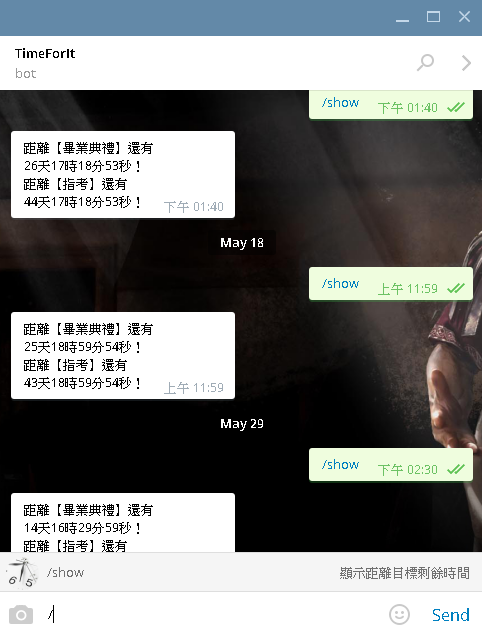
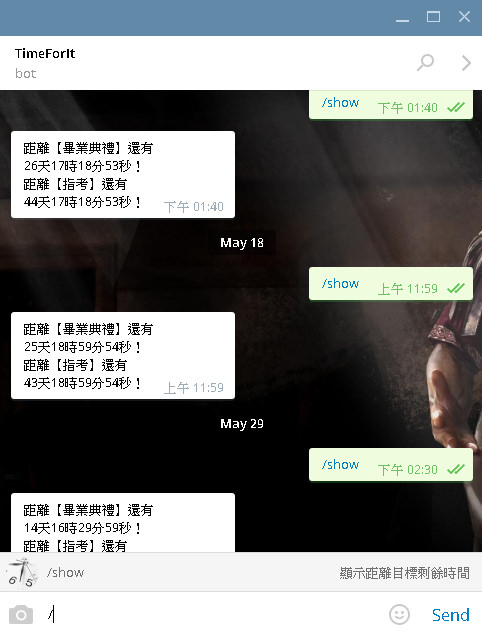
而我設定輸入指令 /show 時 就會彈出距離目標時間還有多久。而且利用 cron job 定時任務,每天都會 run 這程式發送一次倒數訊息。這就是整個簡單的概念。

接下來,在 tg 上就可以直接操作並直接顯示結果了,唯一缺陷就是沒有指令選單。這時可以再向 BotFather設定,輸入 /setcommands,再輸入 @botname,指令(英文)+空格+簡介。(可以多行輸入)

最終預防機器人被濫用亂加入群組,可以設定鎖定,/setjoingroups → @botname → Disable。

這樣就大功告成了。其他功能自己探索,其實很簡單的。


This entry was posted in Experience, Functions, General, Note, PHP, Software By .

PHP 利用 cUrl 抓取 HTTPS/HTTP 網頁

-
發布於

最近不知道要發什麼,這篇這是純當筆記用。

$ch = curl_init();
curl_setopt($ch, CURLOPT_URL, $data);
if (stripos($data,'https://')===0){
	//網址是https,設定SSL。
	curl_setopt($ch, CURLOPT_SSLVERSION,CURL_SSLVERSION_DEFAULT);
	curl_setopt($ch,CURLOPT_SSL_VERIFYHOST,0);
	curl_setopt($ch,CURLOPT_SSL_VERIFYPEER,0);
}
curl_setopt($ch, CURLOPT_VERBOSE, true);
curl_setopt($ch, CURLOPT_HEADER, true);
curl_setopt($ch, CURLOPT_RETURNTRANSFER, true);
curl_setopt($ch, CURLOPT_FOLLOWLOCATION, true);
curl_setopt($ch, CURLOPT_USERAGENT, 'Mozilla/5.0 (Windows NT 6.3; WOW64) AppleWebKit/537.36 (KHTML, like Gecko) Chrome/44.0.2403.155 Safari/537.36');
curl_setopt($ch, CURLOPT_MAXREDIRS, 999);
$html = curl_exec($ch);
$header_size = curl_getinfo($ch, CURLINFO_HEADER_SIZE);
$header = substr($html, 0, $header_size);
$html_body = substr($html, $header_size);
curl_close($ch);


This entry was posted in General, PHP, Functions, Note, The Internet By .

超商繳費儲錢進去Paypal帳號

-
更新於

此方法已過時!請勿使用!未來將會可能重新更新此文章!


首先,這個方法透過不少外國管道!請別擔心。

此方法僅提供一個讓你透過超商繳費的方法可以付款用於大多數線上網站。


第一步先註冊BitoEx的帳號:https://www.bitoex.com

註冊帳號是為了購買全球通用的國際虛擬貨幣比特幣。

而比特幣可以在 BitoEx 購買到。建議購買至少 500 NT$。(可全家超商繳費付款,目前只能"全家"!)

買比特幣教學參考:https://www.bitoex.com/fami?locale=zh-tw

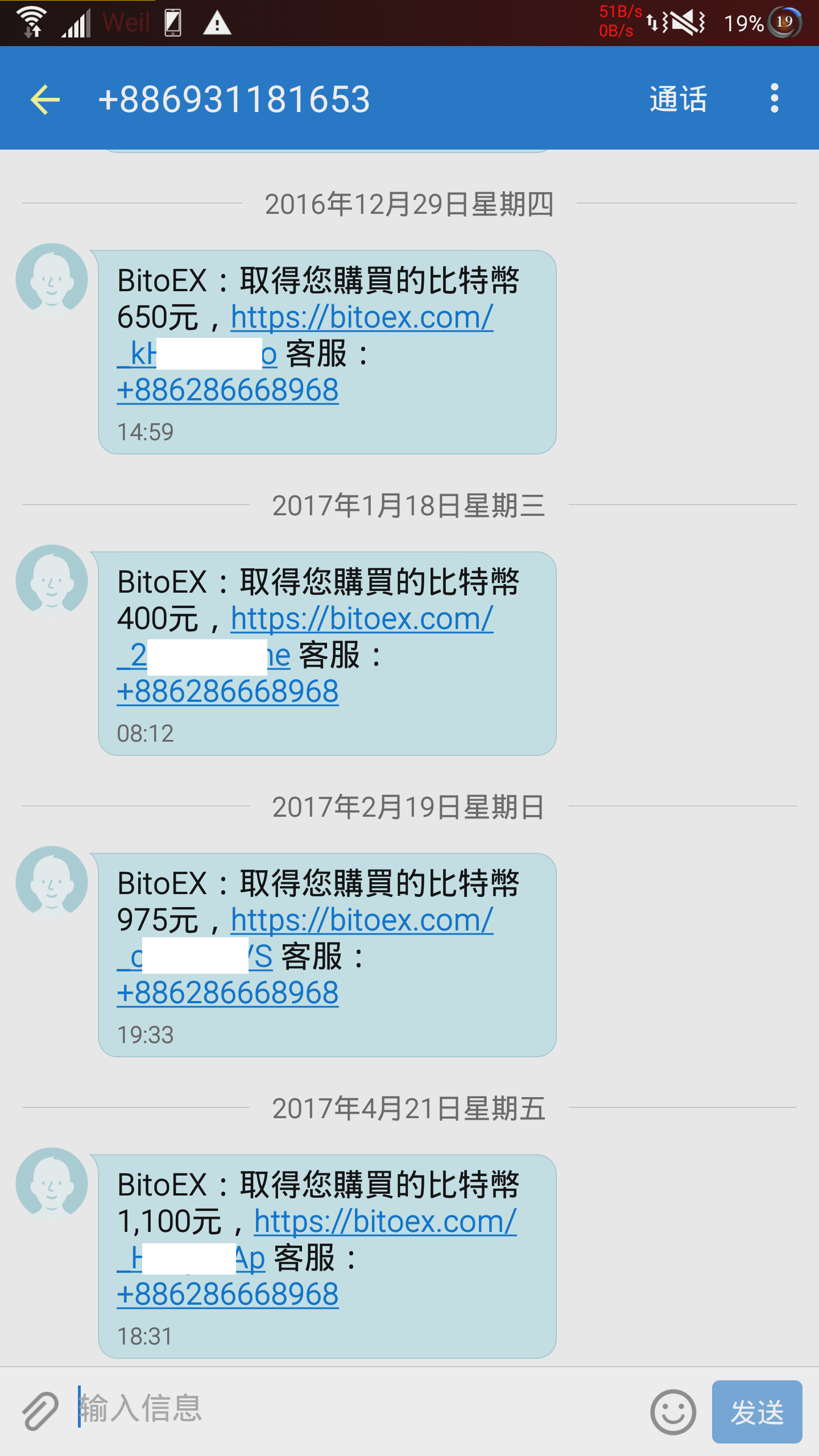
購買完成之後,通常會收到簡訊。如下:

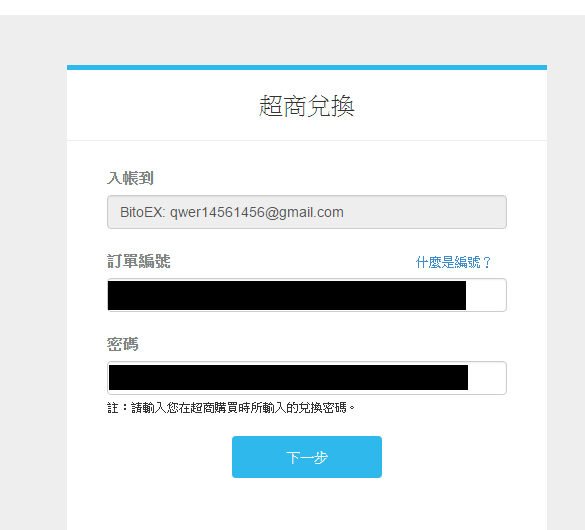
然後,請先開好瀏覽器,登入進去BitoEx,接著點手機裡收到的連結。依照指示儲金額進入BitoEx。

兌換到我的錢包就可以了!(畫面僅供參考)

然後就去 Cryptopay 註冊帳號:https://cryptopay.me/join/f526d895

(使用上面的連結買金融卡可以打 75 折。)

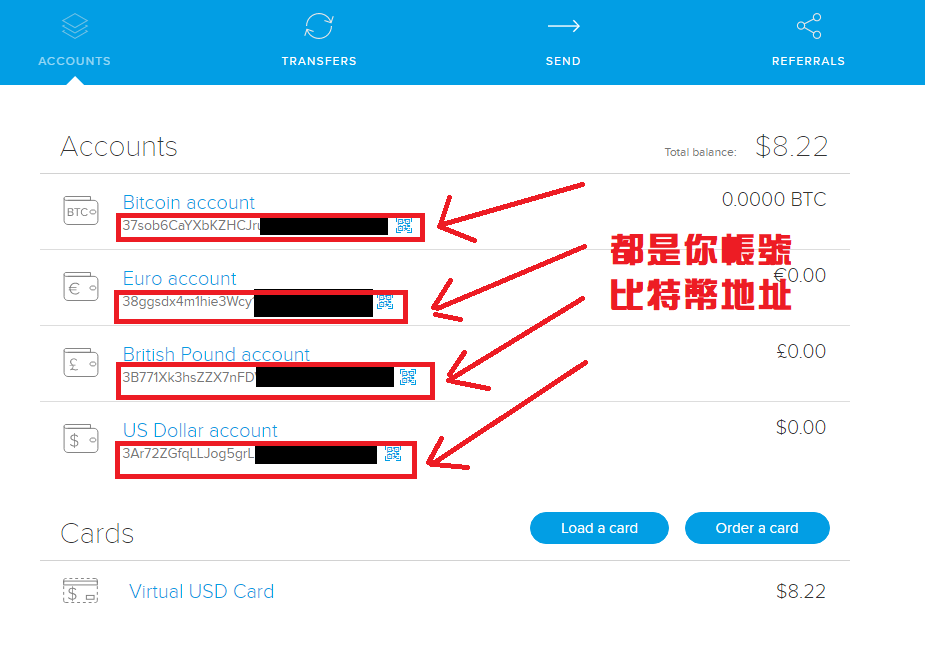
註冊好帳號後,記得驗證 Email,然後登入,就會看到如下介面。

這四組比特幣地址都是你自己帳號的錢,只是貨幣單位不同,而且轉換過去後,就不會被比特幣價格升降而影響到幣值大小。建議直接複製 Bitcoin Account 的地址。之後要儲錢的話,可以直接寄到 USD Account。

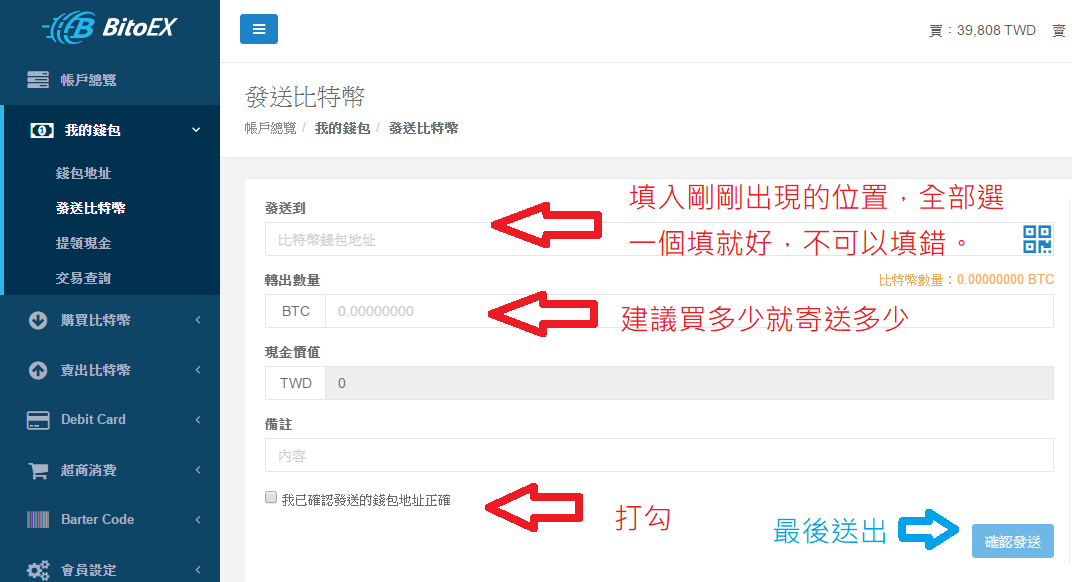
就可以直接透過 BitoEx 寄送金額到這個國外網站。

這步驟!請注意!比特幣寄送的過程需要耗費十五分鐘至數小時,可能要等待很長一段時間才會入帳!

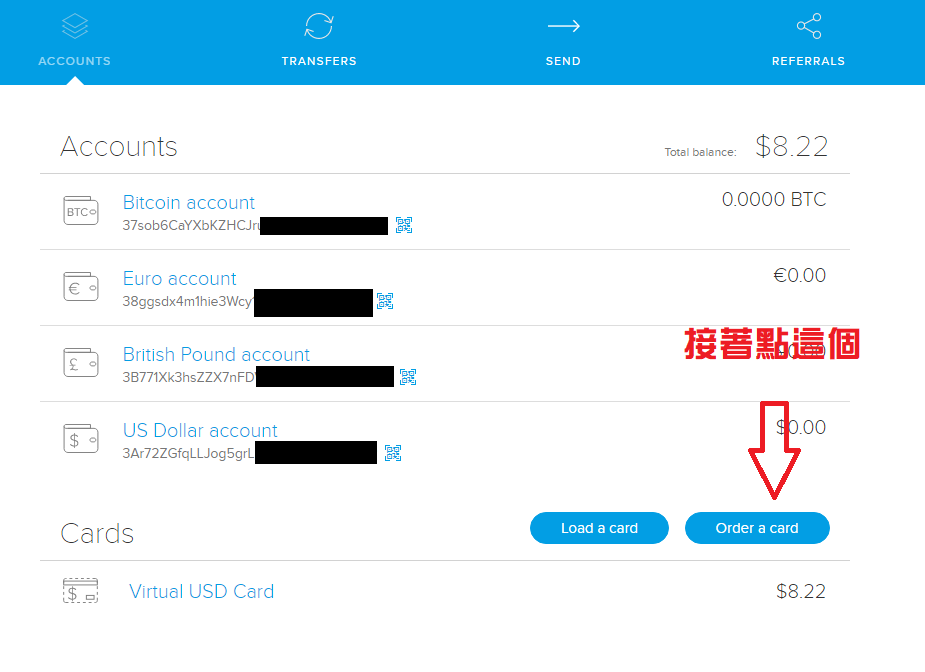
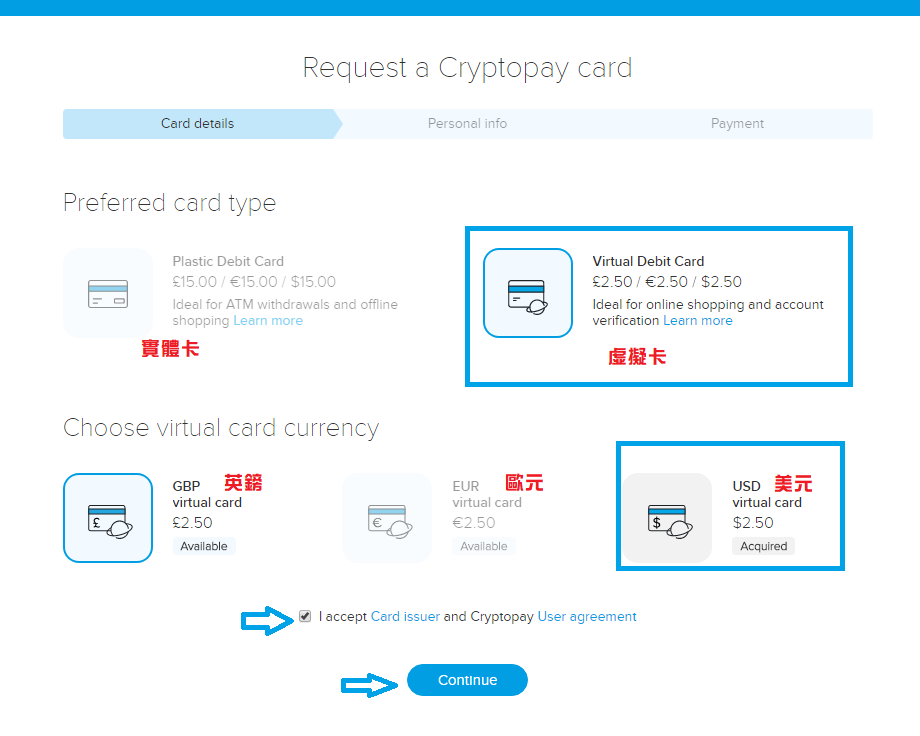
然後可以開始購買虛擬卡。

個人建議是買 USD 的虛擬卡拉,有其他需求就依照你自己的想法。

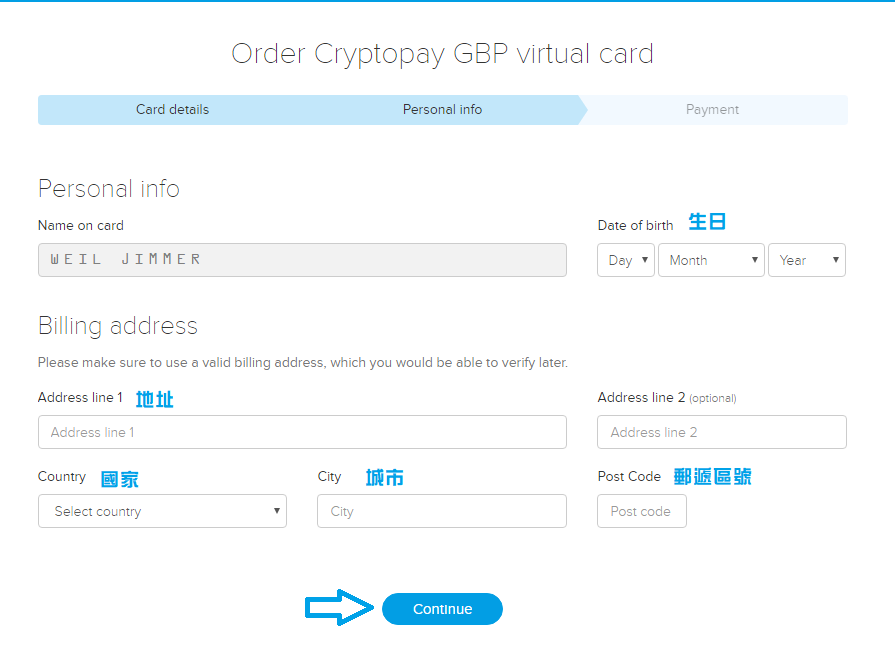
填入好基本資料後就可以送出了,基本上是可以亂填的。

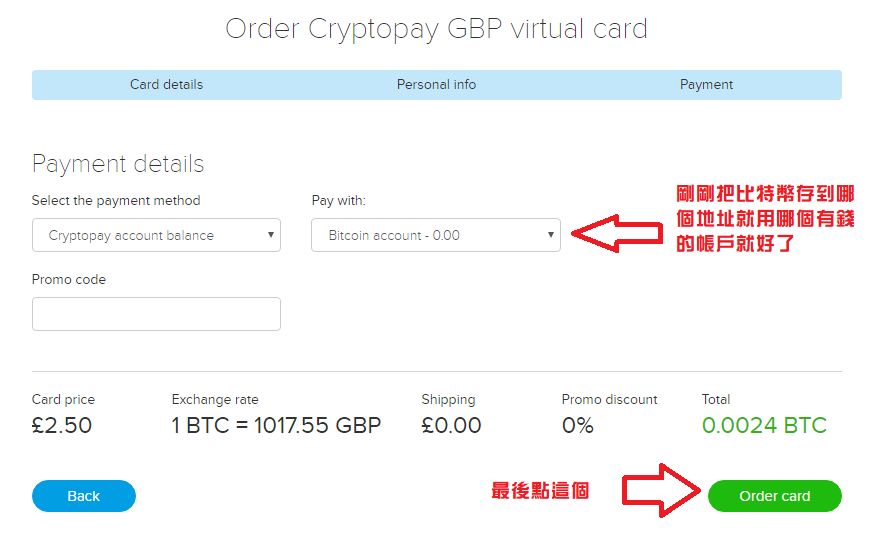
然後選擇剛剛儲進金額的 Bitcoin Account,除非你儲在別的地方,切換到有錢的帳號即可。

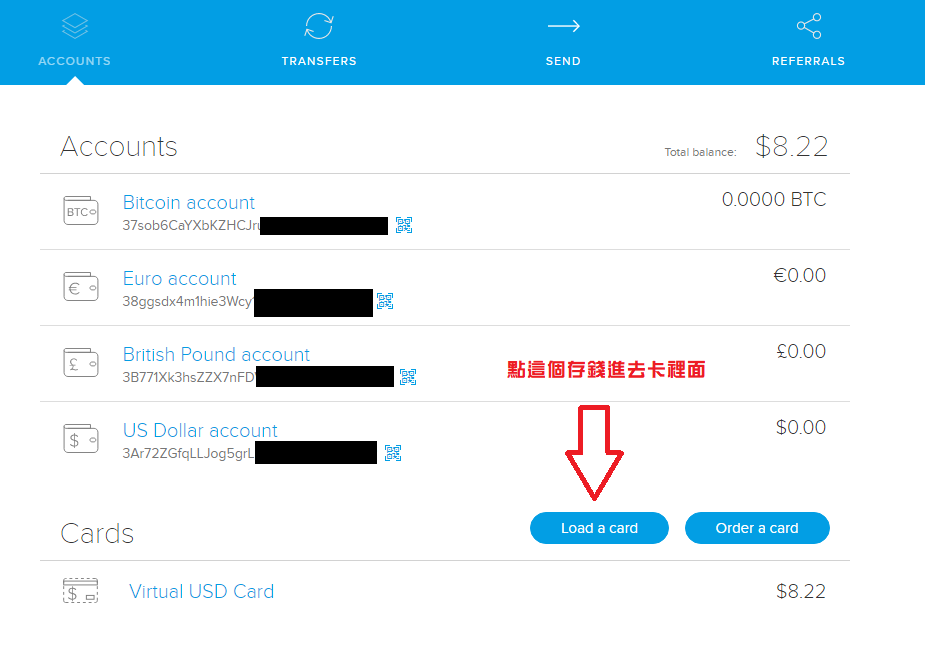
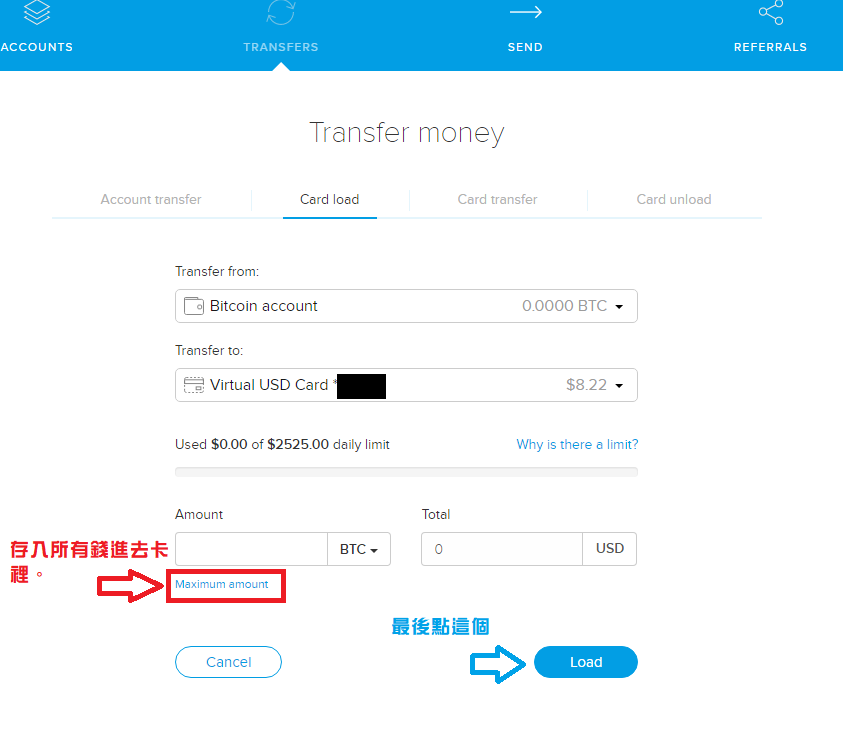
接著購買完成後,就可以正式來使用了。先儲錢進去虛擬卡。

建議點 Maximum amount,直接儲最大金額,帳戶類別一樣要選有錢的帳戶,最後你就可以擁有比特幣的金融卡了!

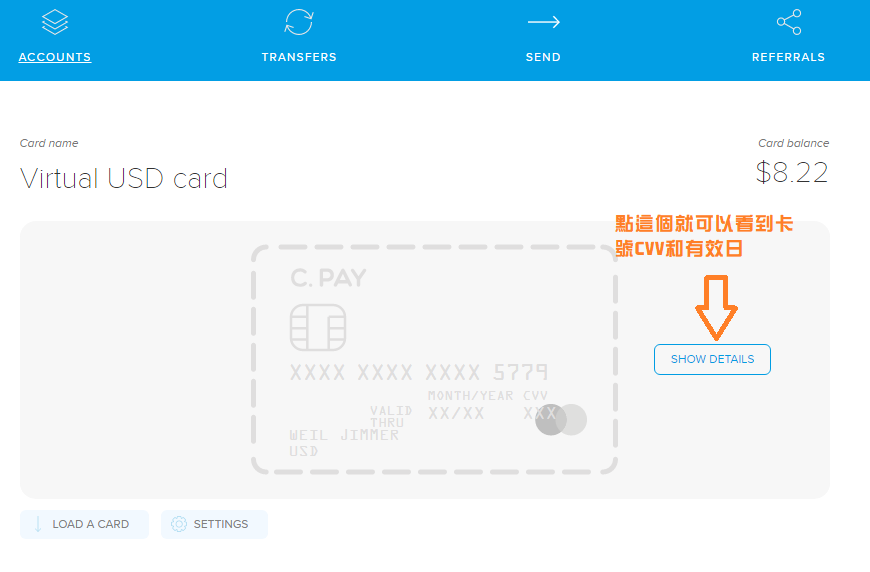
點那個按鈕可以知道你的卡號和安全碼及有效年月。

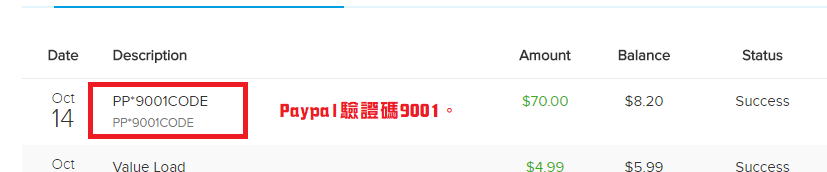
就會有紀錄在你的交易項目了!而那四位數字就是你的驗證碼。刷新Paypal,填入四位數字驗證碼就完成驗證了!

接著你就可以利用 Paypal進行匿名全球交易,而且只靠"超商繳費"與假身分。

最後我還是要說一件重要的事情,每個月維持卡的費用是1美金,以及這張卡有一些使用上限,可以參考:https://cryptopay.me/bitcoin-debit-card

基本上,使用上限是 2500 €/£/$ ,除非你驗證你的帳號,上傳身分驗證。

以上。

By Weil Jimmer


This entry was posted in Experience, Functions, General, Note, The Internet By .